
Atlassian Partner of the Year 2026

Nave for Jira

Turn your Jira delivery data into evidence about flow, predictability and where work is slowing down.

14 days, no credit card.

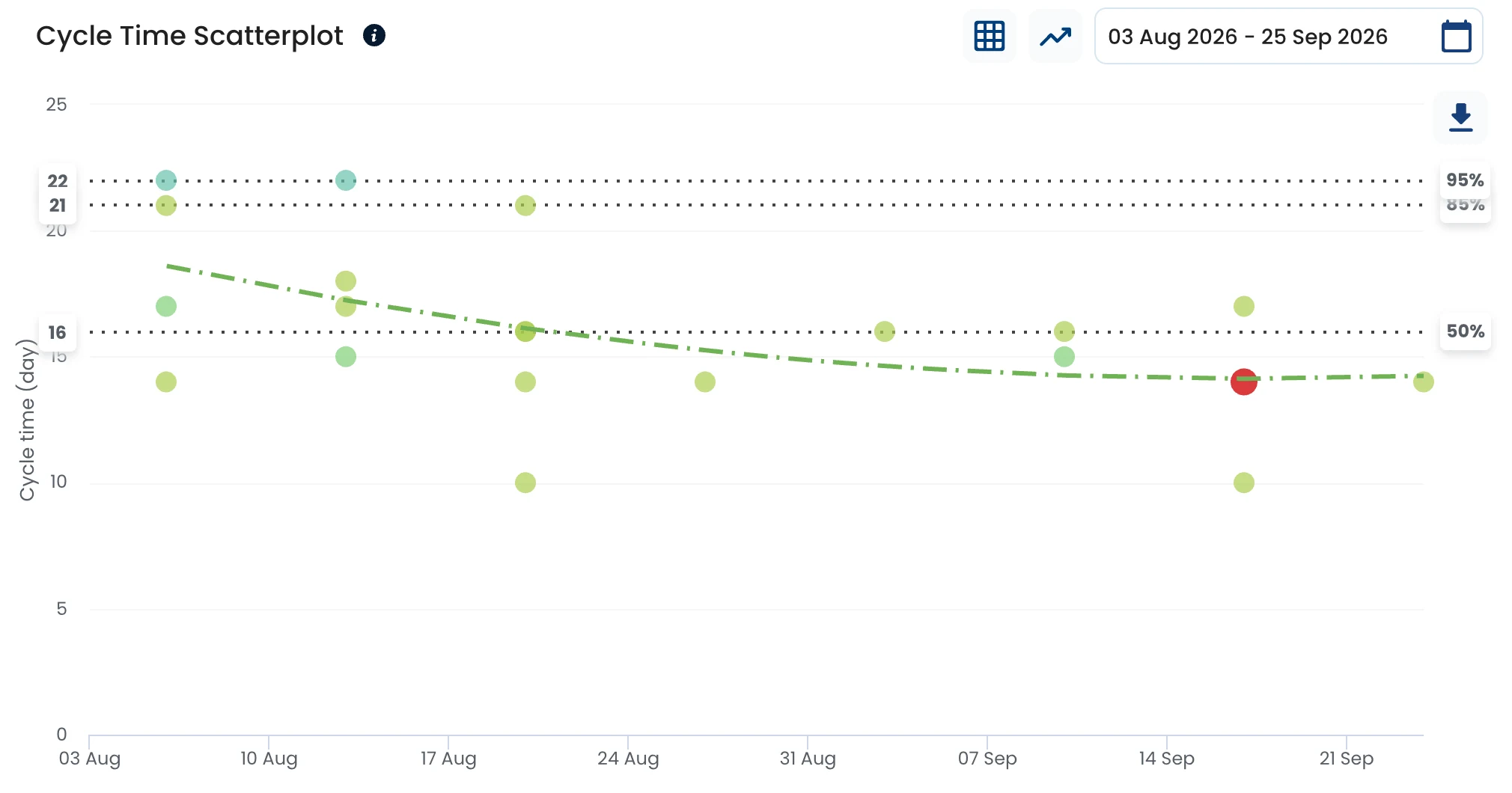
Cycle Time Scatterplot in Nave for the Mobile Platform team, 3 August to 25 September 2026: each dot is a completed issue; percentile lines at 16 days (50%), 21 days (85%) and 22 days (95%); the trendline falls from about 19 days to about 14

Jira delivery analytics

What can you learn from your Jira data?

  • Where is delivery slowing down?

    See cycle time by workflow stage, waiting and blocked time, and the bottlenecks holding work up.

  • What needs attention right now?

    See aging work and items approaching or exceeding your normal delivery expectations.

  • Are we actually improving?

    Track cycle time, throughput, WIP, flow efficiency and variability over time.

  • What can we realistically deliver?

    Use Monte Carlo forecasting based on actual Jira throughput, not estimates.

How it works

From Jira workflow to delivery evidence

Connect a board, map its workflow and use the resulting evidence to decide where to act next.

  1. 1

    Jira board

    Choose the Jira board whose delivery flow you want to understand.

  2. 2

    Nave dashboard

    Map columns to workflow stages and mark the stages where work waits.

  3. 3

    Delivery evidence

    Nave computes flow metrics from the board’s existing delivery history.

  4. 4

    Decision

    Use the evidence to address constraints, forecast delivery and track improvement.

Diagram

Jira board columns

  1. To do
  2. In Development
  3. Code Review
  4. Ready for SITWaiting stage
  5. SIT
  6. UAT
  7. Awaiting ReleaseWaiting stage
  8. Done

Nave workflow stages

  1. Not started
  2. In progress
  3. Done
Map Jira columns to workflow stages, marking waits to separate active time from waiting time.

Start with the history you already have.

Connect your Jira board and Nave turns its existing delivery history into flow metrics, so you don’t have to wait weeks to start learning from your data.

Keep managing work in Jira. Use Nave to understand how that work flows.

Jira

Manage issues, boards, projects and workflows where your teams already work. Jira remains where the work is managed.

Nave

Use Jira delivery history to answer system-level questions about flow, predictability, aging, bottlenecks, improvement and forecasting, without changing how teams manage work in Jira.

Find constraints

Find where delivery slows down

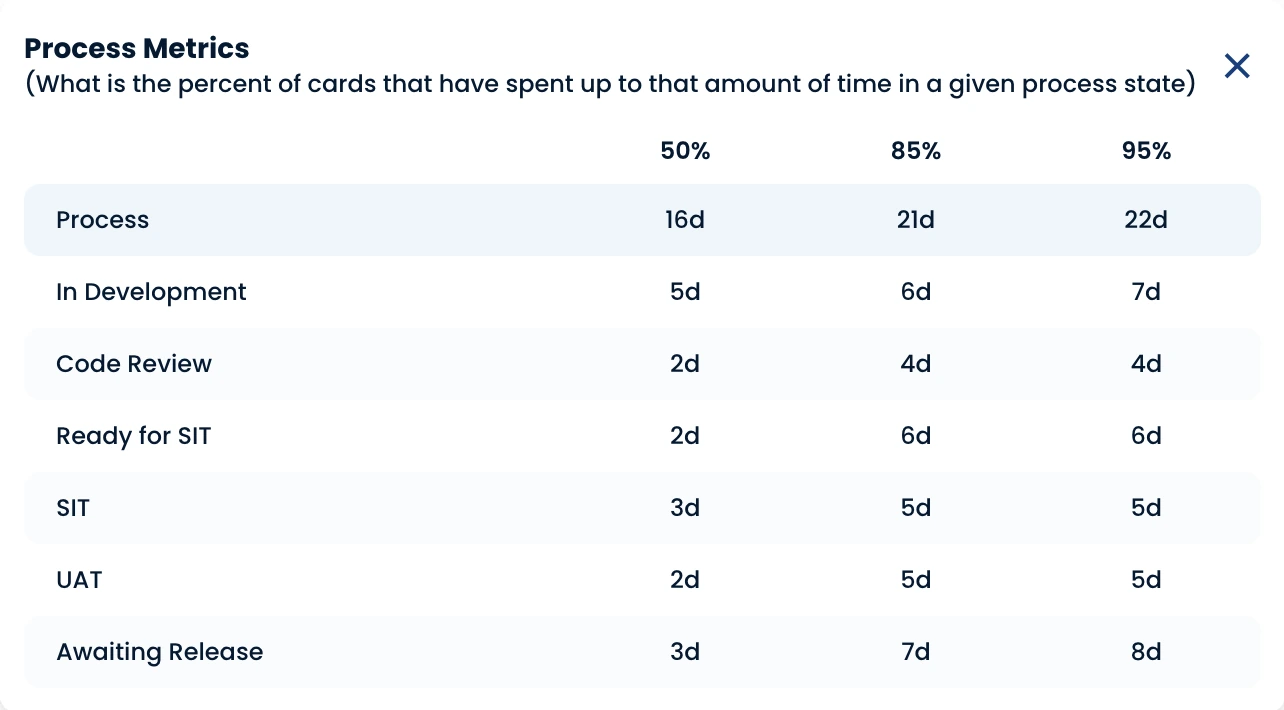
The Mobile Platform table shows, from Aug 3 to Sep 25, 2026, when 50%, 85%, and 95% of issues left each stage. Across the process, 85% finished within 21 days. At the 85th percentile, Ready for SIT took up to 6 days, Awaiting Release 7, and Development 6. Waiting stages equaled or exceeded active development.

Explore Cycle Time Breakdown 
Process Metrics table in Nave for the Mobile Platform team: the time within which 50%, 85% and 95% of issues left each stage. Process 16, 21, 22 days; In Development 5, 6, 7; Code Review 2, 4, 4; Ready for SIT 2, 6, 6; SIT 3, 5, 5; UAT 2, 5, 5; Awaiting Release 3, 7, 8
Process Metrics for Mobile Platform, August 3 to September 25, 2026.

Current work

Know what needs attention

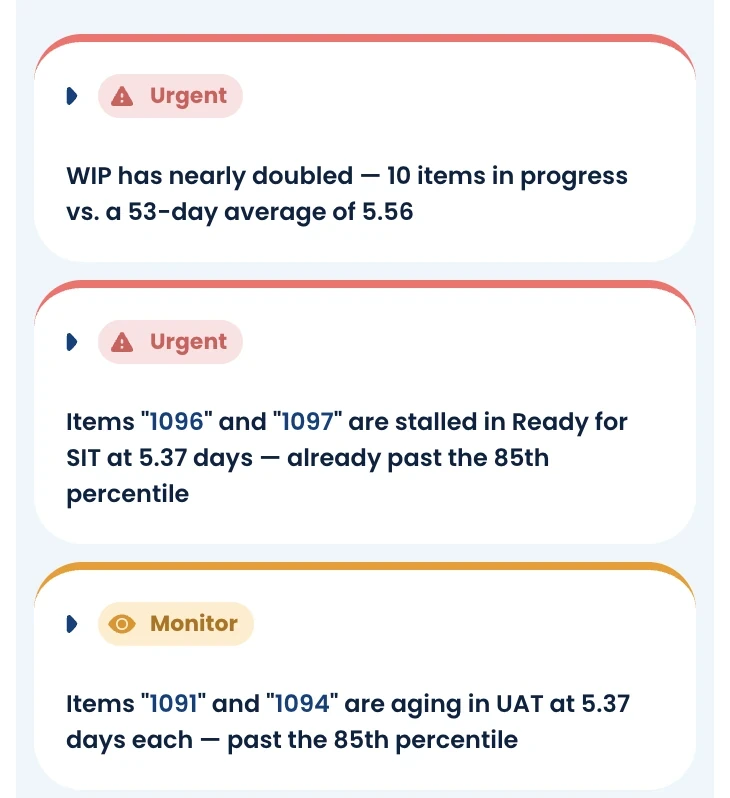
The AI Investigator reads computed flow metrics and points to the stage and work items behind a problem. Here, it flags WIP at 10 items versus a 53-day average of 5.56, and two items stalled in Ready for SIT for 5.37 days, past the 85th percentile. If the evidence doesn’t support a meaningful finding, it returns none.

The numbers are computed, not generated. The AI only reads them, so swap the model and the numbers don't change.

Explore AI Investigator 
Nave AI Investigator insights for the Mobile Platform team. Urgent: WIP has nearly doubled, 10 items in progress versus a 53-day average of 5.56. Urgent: items 1096 and 1097 are stalled in Ready for SIT at 5.37 days, already past the 85th percentile. Monitor: items 1091 and 1094 aging in UAT
AI Investigator findings for Mobile Platform during the same period.

Plan realistically

Forecast from actual delivery history

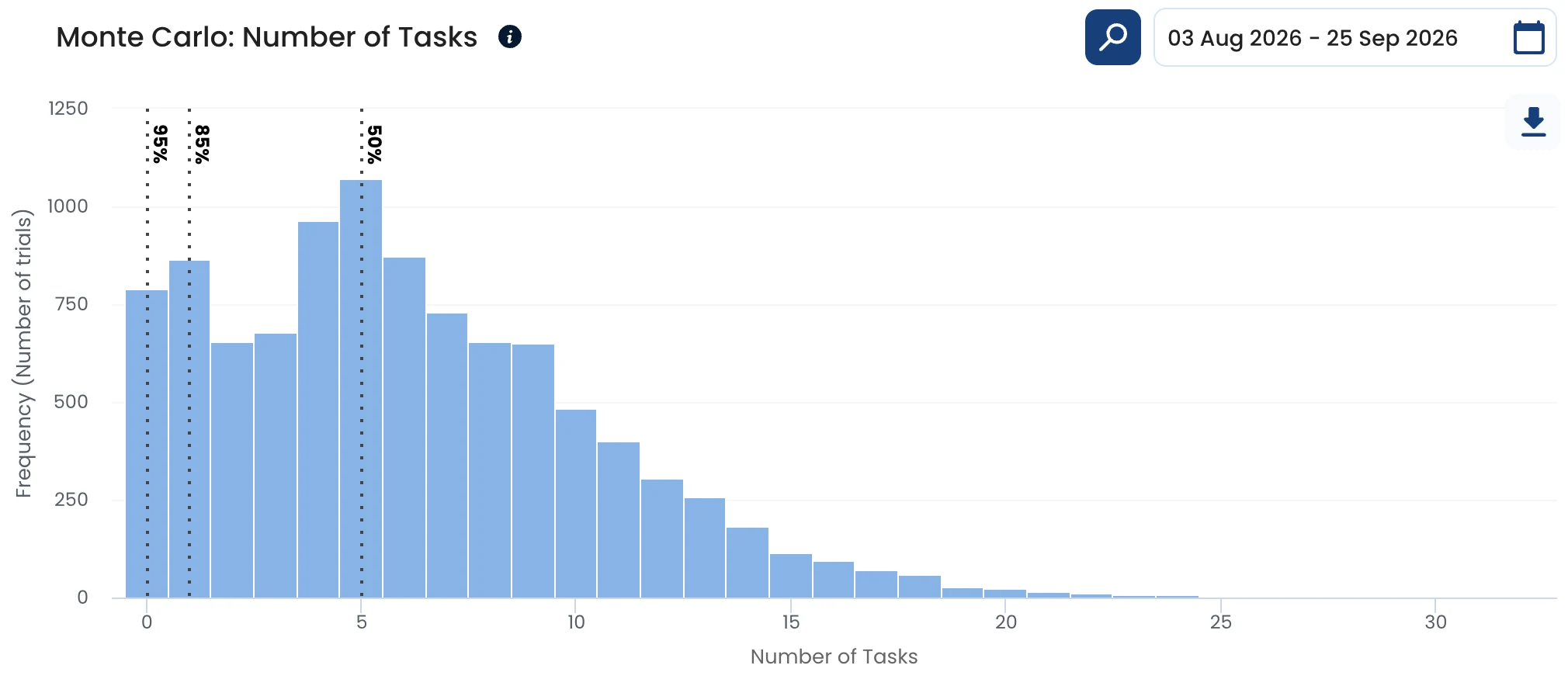
Monte Carlo runs 10,000 trials using this team’s daily throughput from August 3 to September 25. It forecasts how many items will finish from September 30 to October 14 at 50%, 85% and 95% confidence. There are no story points or estimates, and the Continuous Forecasting dashboard recalculates daily.

Monte Carlo: Number of Tasks in Nave for the Mobile Platform team: a histogram of 10,000 simulated outcomes for the number of items finished between 30 September and 14 October 2026, with the 50%, 85% and 95% confidence lines
Monte Carlo forecast using Mobile Platform’s daily throughput.

Explore Continuous Forecasting 

Customer stories

Why Jira teams added Nave

“We are using Jira, and the main issue with it is that it doesn’t give us any visibility to flow metrics. The data is there, but we cannot actually see it in an easy way.”

Pawel LewinskiScrum Master and Accredited Kanban Trainer

Improved delivery times by 30%

Read Pawel's story 

“This worked for a while but once the whole company started using Jira we felt the need to up our game, and this is when we discovered Nave.”

Reinaldo SimizuAgile Coach at Matera

Cut lead times by 4x

Read Matera's story 

Explore what Nave adds to Jira

Measure change

Track improvement over time

The Process Improvement dashboard uses natural process limits from your team’s own history to distinguish real signals from normal variation. Track cycle time, throughput, WIP, flow efficiency and variability over time without treating every change as meaningful.

Scale the view

For one team or across the organization

Start with a team dashboard. Roll Jira teams into Services and Portfolios, place Jira teams alongside Azure DevOps teams in a Service, and compare performance over time across teams and services in Executive Dashboards.

  1. Team dashboards
  2. Services
  3. Portfolios

Connect Jira

Choose your Jira edition and connect

  • Jira Cloud

    Log in with a click through OAuth 2.0. Nave only sees what your Jira account can see.

    Connect Jira 
  • Jira Server and Data Center

    A Jira administrator links Nave once. Users enter the Host URL to authorize. The instance must be internet-accessible; otherwise, upload CSV or JSON data or use the Nave API.

    Read the setup guide 

Reading and handling data from Jira

What comes across

Nave reads board ID, name and columns; issue keys, summaries, priority, created and due dates; status changes; flagged or blocked time; assignee names and avatars; selected custom fields; and Jira links. Descriptions, comments and attachments are not included.

Statuses become stages

Each dashboard maps one Jira board. You map its columns to not started, in progress and done, then mark waiting stages so flow efficiency separates active time from waiting time.

Filters

Filter dashboards by issue type, labels and the custom fields you choose to bring into Nave.

Your existing history

Nave loads recent Jira history first, including three months of completed work by default. Choose an earlier date range to load older work.

What Nave never does

Nave never accesses your Jira password. It never creates, changes or deletes issues, comments, boards or projects, and only sees what your account can see.

Privacy controls

Choose not to store task names, a setting users cannot reverse. Contact Nave to hide all person-related fields from a Jira dashboard.

Security and compliance

  • SOC 2 Type II
  • GDPR
  • Atlassian Cloud Fortified
  • Data hosted in the EU

See frequently asked questions 

Connect Jira and start with your own data

Start a 14-day trial with every feature and no credit card, or sign in to continue with an existing account.